How to Fill Out a PDF Form Online
Quick answer
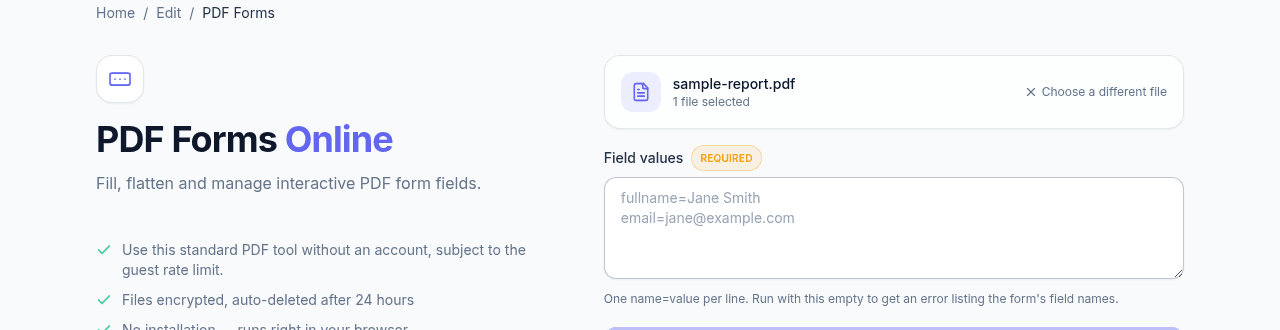
PDF Forms fills interactive form fields by name — enter values one per line as name=value, like fullname=Jane Smith. If you do not know a form's exact field names, run it once with the values box empty and the error lists every field it found. This only works on real interactive forms; a flat printed layout has no fields to fill and needs text added on top instead.
Interactive forms vs. flat PDFs
Some PDFs have real interactive form fields built in — text boxes, checkboxes, dropdowns — that software can fill programmatically. Others just look like a form but are flat, printed layouts with no underlying fields; those need to be filled by adding text on top instead, which PDF Forms doesn't do.
Filling a form by field name
Upload the PDF and enter field values one per line as name=value, like fullname=Jane Smith. If you don't know a form's exact field names, run PDF Forms with the values box empty first — it returns an error listing every field name it found, which you can then copy into the correct format.
After filling
The downloaded PDF has the values filled into their fields, still editable unless you also flatten it. Flattening converts filled fields into permanent page content — useful once a form is final and you don't want anyone accidentally changing an answer while reviewing it.
Frequently asked questions
How do I find a form's field names?
Run the tool once with the values box empty. It returns an error listing every field name it found in the document, which you can copy straight into your name=value lines.
What if the form has no fields at all?
Then it is a flat layout that only looks like a form, and there is nothing to fill programmatically. Add the text on top of the page with Edit PDF instead, positioning each value where the printed line sits.
How do checkboxes and dropdowns work?
They take a value by name like any other field, but the accepted value is one the form itself defines rather than free text. The empty-run listing gives you the field names; if a value is rejected, the field is expecting one of its own defined options.
What does flattening actually do?
It converts the filled values into permanent page content, so the fields stop being editable. That is what you want once a form is final and you do not want a reviewer changing an answer by accident — keep an unflattened copy if you might still need to revise it.